Open Closed Eyes in Photo - Free AI Tool
Someone blinked at the wrong moment? Fix it instantly with our AI eye opener. Upload the photo and a reference with open eyes to get the perfect shot.
What is an AI Eye Opener?
An AI eye opener is a tool that automatically detects closed eyes in photos and replaces them with natural-looking open eyes from a reference image. Using advanced face recognition and blending technology, it seamlessly corrects blinks in group photos, wedding shots, and portraits — saving moments that would otherwise be ruined.
Upload Photo with Closed Eyes
See Real Before & After Results
See how our AI corrects blinks with natural-looking results. Real examples showing the transformation from closed to open eyes.
Before, Detection & After
Watch how our AI detects faces and seamlessly corrects closed eyes using the reference photo. The result shows natural, undetectable eye correction.
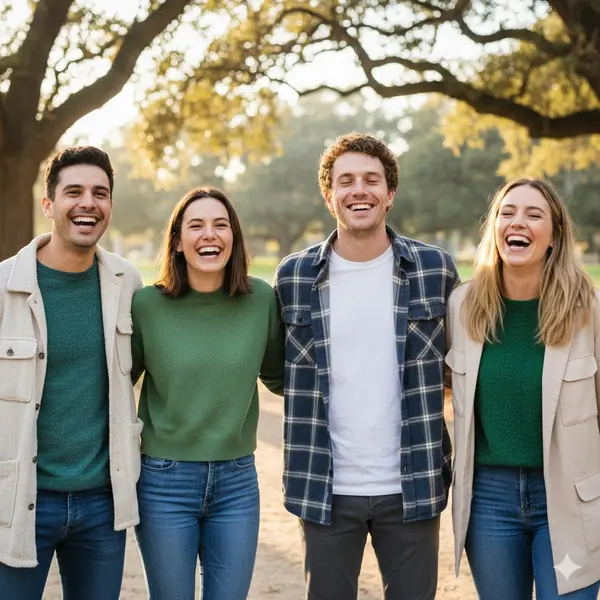
Closed Eyes
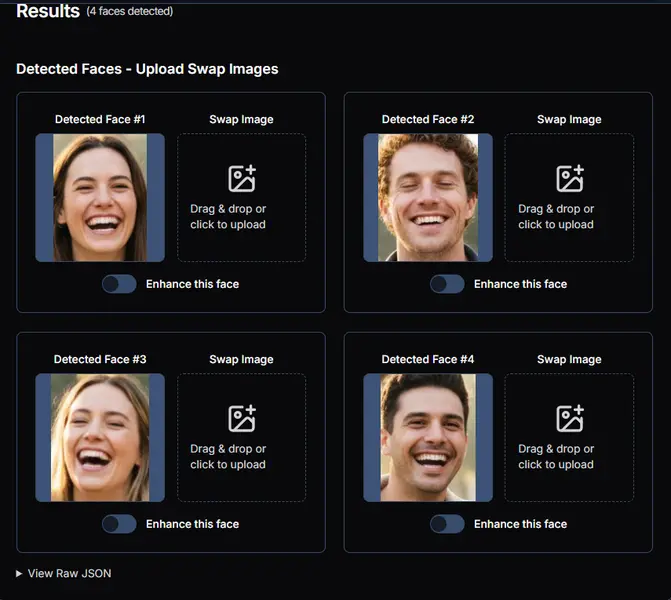
Face Detection
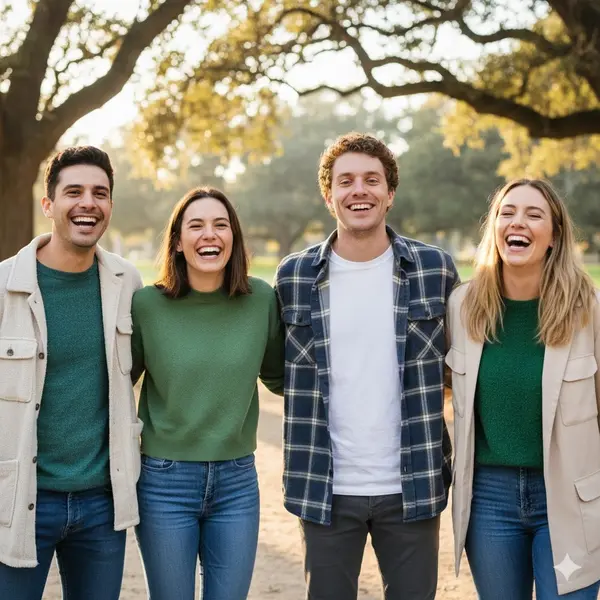
Open Eyes
Fix Blinks in Group Photos
Group photos often have someone with closed eyes. Our tool corrects blinks for everyone at once — perfect for family gatherings, team photos, and events!
Try It FreeAI Eye Correction Features - Free & No Watermark
Advanced AI technology that naturally corrects closed eyes in any photo
Smart Face Detection
Our AI automatically detects all faces and identifies closed eyes. Works perfectly for group photos, family portraits, and professional shots where someone blinked at the wrong moment.
Natural-Looking Results
Using advanced face matching, we seamlessly blend the eye region from your reference image. The result looks completely natural with matched lighting, skin tones, and expressions — no one will notice the correction.
No Watermark, Completely Free
Fix closed eyes without any watermarks or hidden fees. Our AI tool is completely free to use — perfect for saving photos ruined by blinks. Get professional results instantly.
Fast Processing
Get your corrected photo in seconds, not minutes. Upload your photo and reference, and the AI handles the rest instantly. Save those precious moments that were almost ruined by a blink.
How to Open Closed Eyes in Photo - 3 Easy Steps
Fix blinks and get natural-looking results with our free AI tool
Upload the Photo with Closed Eyes
Upload the photo where someone blinked. This could be a group photo, wedding shot, or any picture where a blink ruined the perfect moment. We support JPG, PNG, and WebP formats.
Detect Faces and Upload Reference
Click 'Detect Faces' to identify faces that need correction. For each person with closed eyes, upload a reference photo with their eyes open. Use a photo from the same session for best results.
Download Your Corrected Photo
Click 'Open Eyes' and our AI will seamlessly fix the closed eyes. Download your perfect photo with no watermark — the moment is saved!
Why Choose Our AI Eye Opener Tool
- Completely free to use
- No watermark on results
- Natural eye correction
- Works with group photos
- Perfect for wedding photos
- Instant blink correction
Want a deeper dive? Read our complete guide on how to fix closed eyes in photos with tips for weddings, group shots, and tricky lighting.
Explore More AI Face Swap Tools
Image Face Swap
Swap faces in any photo with ultra-realistic AI blending. Perfect for portraits, memes, and creative projects.
Multiple Face Swap
Got a group photo? Replace several faces at once with pinpoint accuracy and natural-looking results.
Video Face Swap
Swap faces across entire videos with frame-by-frame AI processing. HD quality with multiple face support.
Frequently Asked Questions
Is this eye correction tool really free?
Yes, our AI eye opener is completely free. You can fix closed eyes in photos without any hidden costs, subscriptions, or watermarks. Use it as many times as you need!
How does the AI fix closed eyes?
Our AI uses advanced face technology to seamlessly replace closed eyes with the open eyes from your reference image. It matches skin tones, lighting, and expressions for natural-looking results.
What kind of reference photo should I use?
Use a reference photo of the same person with their eyes clearly open. Photos from the same session or similar lighting conditions work best for the most natural results.
Can I fix multiple faces with closed eyes at once?
Yes! Our tool detects and corrects closed eyes for multiple faces at once. Simply upload a reference photo with open eyes for each person who blinked, and the AI fixes everyone in one go.
Will the corrected eyes look natural?
Absolutely. The AI precisely matches the eye region from your reference, blending lighting, skin tones, and expressions. The result is seamless — no one will know someone blinked in the original.
What image formats are supported?
We support JPG, JPEG, PNG, and WebP formats. Both the photo with closed eyes and the reference can be in any of these formats.
How long does the eye correction take?
It's very fast! Face detection takes a few seconds, and the AI corrects closed eyes in 10-30 seconds. Your photo is ready almost instantly.
Can I use this for wedding photos?
Yes! This tool is perfect for wedding photography. We know how frustrating blinks are in important shots. Fix those precious moments and save memories that matter.
What if the person is looking differently in the reference photo?
For the best results, use a reference where the person looks in a similar direction. However, our AI can still produce good results even with slight angle differences between photos.
Do I need an account to use this tool?
No signup required! Simply upload your photos and fix closed eyes instantly. Get your corrected photo and download it without any barriers.